måndag, september 27, 2010
TrycksaksTorget har startat blogg (och bytt lokaler)
Läs gärna TrycksaksTorgets blogg! Där skriver vi om allt som har med trycksaker och trycksaksframställning att göra samt lite nyheter och annat om vårt företag. I det senaste inlägget visar vi lite bilder på våra nya lokaler.


onsdag, oktober 14, 2009
Monogram någon?

Vi har i dagarna släppt vårt nya verktyg för att göra monogram - MonogramStudio.
Perfekt till bröllopsinbjudan eller andra ändamål. Massor av exempelmonogram att inspireras av.
fredag, september 18, 2009
Trygg E-handel
TrycksaksTorget är nu certifierat för Trygg E-handel. Det är en certifiering som visar att kunderna kan handla tryggt och säkert i webbutiken.
måndag, april 06, 2009
Inbjudningskort bröllop - ny produkt på TrycksaksTorget
Vi har efter många förfrågningar även lagt till inbjudningskort bröllop i TrycksaksTorgets produktportfölj. Sedan tidigare hade vi tackkort bröllop.
Vi planerar nu även för ytterligare bröllopstrycksaker och har börjat profilera oss mer mot bröllopsmarknaden.
Vi planerar nu även för ytterligare bröllopstrycksaker och har börjat profilera oss mer mot bröllopsmarknaden.
torsdag, februari 12, 2009
Dell PowerVault 715n Reinstallation with 500GB disks
After one of the four 120GB disks crashed in my Dell PowerVault 715n I decided to upgrade all four disks in it to 500GB. It has been running nicely since 2002 and I could use the extra space.
The reinstallation is a hassle as the 715n has no graphics, mouse or keybord ports. You have to go through PXE booting over the network from a client machine (Windows 2000).
What the reinstallation really does is take a ghost disk image from the reinstallation disk and copy it back to the first of the four disks in the PowerVault disk array.
After doing everything according to the manual I got stuck when ghost was about to start. It reported an out of memory error and rebooted the machine.
After googling the issue I found a solution.
In the 715n Resource CD there is a tool to create the reinstallation boot image onto a floppy. That lets you add the parameters -ws- -wd- to the command that starts ghost. The only thing left then is to update the boot image to match what is on the floppy. There is a tool for that also, which is installed as part of the Reinstallation Console.
Now, it works! Sweet :)
When Windows was installed and I logged in with remote desktop I saw that I had cheered a bit to early. The 500GB disks only showed up as 128GB. After some more investigating this was due to an limitation in disk size for Windows versions before Windows 2000 with Service Pack 3. After updating to SP4 and following this tip I got the first two drives to show their correct size.
Disk 3 and 4 are controlled by a Promise Ultra100 controller (embedded on the motherboard) and they were still showing 128GB. So, what to do? More investigating and I found out that updating the windows driver for the Ultra100 did the trick. The new driver actually showed a lower version number than the one already installed and windows also complained that I was overwriting newer files, but it worked in the end.
The version of the Promise Ultra100 driver is 2.00.0.39 and can be downloaded here.
The reinstallation is a hassle as the 715n has no graphics, mouse or keybord ports. You have to go through PXE booting over the network from a client machine (Windows 2000).
What the reinstallation really does is take a ghost disk image from the reinstallation disk and copy it back to the first of the four disks in the PowerVault disk array.
After doing everything according to the manual I got stuck when ghost was about to start. It reported an out of memory error and rebooted the machine.
After googling the issue I found a solution.
In the 715n Resource CD there is a tool to create the reinstallation boot image onto a floppy. That lets you add the parameters -ws- -wd- to the command that starts ghost. The only thing left then is to update the boot image to match what is on the floppy. There is a tool for that also, which is installed as part of the Reinstallation Console.
Now, it works! Sweet :)
When Windows was installed and I logged in with remote desktop I saw that I had cheered a bit to early. The 500GB disks only showed up as 128GB. After some more investigating this was due to an limitation in disk size for Windows versions before Windows 2000 with Service Pack 3. After updating to SP4 and following this tip I got the first two drives to show their correct size.
Disk 3 and 4 are controlled by a Promise Ultra100 controller (embedded on the motherboard) and they were still showing 128GB. So, what to do? More investigating and I found out that updating the windows driver for the Ultra100 did the trick. The new driver actually showed a lower version number than the one already installed and windows also complained that I was overwriting newer files, but it worked in the end.
The version of the Promise Ultra100 driver is 2.00.0.39 and can be downloaded here.
onsdag, november 05, 2008
Min syster är möbeltapetserare
Äntligen har jag lyckats få ändan ur vagnen och hjälpt min syster Elisabeth med hemsidan till hennes företag Licasa som sysslar med möbeltapetsering och hemmiljö. Elisabeth och hennes man Robson (som är möbelsnickare) har varsitt företag i Östhammar där de bor och nu har de också varsin hemsida!
torsdag, oktober 09, 2008
måndag, september 22, 2008
Ny hemsida för Tandvårdsteamet Björn Hedman
Jag har hjälpt tandläkare Björn Hedman i Leksand att få igång en hemsida inom praktikertjänsts ramverk.
måndag, juni 30, 2008
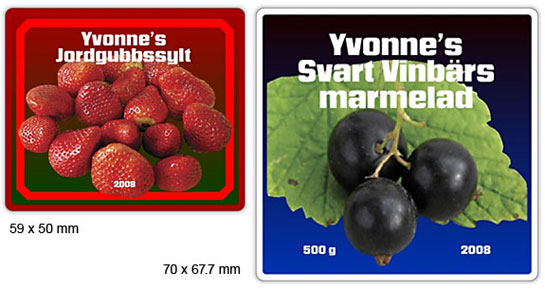
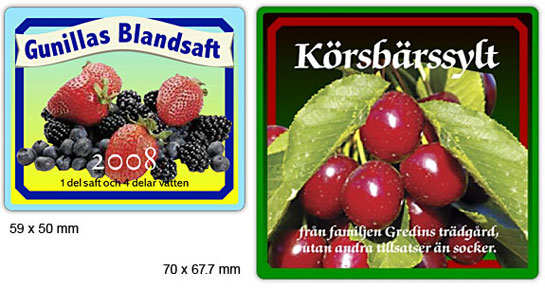
Etiketter för saftflaskor och syltburkar
Lagom till frukt- och bärsäsongen har vi äntligen har vi blivit klara med våra etiketter för saft och sylt på TrycksaksTorget. Nedan några exempel de etiketter som kan skapas:


fredag, februari 22, 2008
Etiketter - ny produktlansering på TrycksaksTorget
 Idag har vi lanserat en ny spännande produkt på TrycksaksTorget. Nu kan man utforma och beställa riktigt snygga etiketter.
Vad är det då som är så speciellt med just de här etiketterna. Jo, för det första finns en mängd storlekar (22 st) att välja på och om man räknar in att man kan utforma dem antingen i stående eller liggande format, täcker de in de flesta behov.
Man kan göra allt från småetiketter så som namnetiketter och adressetiketter till större klistermärken och dekaler.
Sen är det också så att man kan lägga en bild eller logotyp och som kan ses på bilden kan bakgrundsfärg och kant färgsättas fritt. Som i alla andra våra applikationer har man över tusen typsnitt till förfogande.
Ska bli kul att se hur etiketterna kommer användas av våra kreativa kunder.
fredag, november 09, 2007
TrycksaksTorget fyller 1 år
Vår webbshop för trycksaker fyller 1 år. Tiden har gått med en rasande fart men om man tittar tillbaka på hur mycket vi hunnit med känns det jättebra.
Hittills är de här produkterna igång:
Nästa stora produktgrupp som vi ska ta tag i är trycksaker till bröllop. Vi hoppas vara klara med detta till våren/sommaren 2008.
Vi har även investerat i lite nya maskiner för att klara produktionen. Vi numera två digitalpressar istället för en vilket ger oss bättre kapacitet och skydd mot maskinfel. För att klara den stora modellen av studentskyltar (A2) hav vi också investerat i en storformatsskrivare.
Hittills är de här produkterna igång:
- Diplom för företag och idrottsföreningar.
- Dopkort (inbjudningskort och tackkort).
- Familjekalender - översikt för familjen, upp till 8 kolumner.
- Tre olika varianter på fotokalender - A4, A3 och bordskalender.
- Föreningskalender där föreningens klubbmärke eller sponsorers logotyper kan läggas in på varje månadsblad.
- Företagskalender där företagets logotyp kan läggas in på varje månadsblad.
- Inbjudningskort för barnkalas, fest, födelsedagskalas, kräftskiva, vernissage, etc.
- Studentskylt / Studentplakat i två storlekar - A3 och A2
- Tackkort för begravning, bröllop, dop, konfirmation, fest, studentexamen, etc.
- Visitkort i 16 grundutformningar i sig själva kan varieras i oändlighet.
Nästa stora produktgrupp som vi ska ta tag i är trycksaker till bröllop. Vi hoppas vara klara med detta till våren/sommaren 2008.
Vi har även investerat i lite nya maskiner för att klara produktionen. Vi numera två digitalpressar istället för en vilket ger oss bättre kapacitet och skydd mot maskinfel. För att klara den stora modellen av studentskyltar (A2) hav vi också investerat i en storformatsskrivare.
fredag, juli 07, 2006
Default passwords for Konica Minolta Bizhub 450C
These passwords come in handy when you need to setup your bizhub.
Printer: 12345678
Fiery rip: Fiery.1
Printer: 12345678
Fiery rip: Fiery.1
onsdag, juli 05, 2006
Konica-Minolta Bizhub C450 driver tricks
We found our Bizhub C450 (with Fiery Rip) lacking in functionality. We could not use the Thick1 paper type with the booklet function. This should work as we had tried to use the booklet function with a Thick1 kind of paper and set the paper type to normal in the driver, and the printer had no problem folding this thick paper. But the driver would not allow the combination of Thick1 and booklet.
Also we wanted to be able to create booklets from documents that where laid 2 pages up on one document page. The driver would only allow us to create booklets where each page where separate in the document.
A couple of edits in the file: C:\WINDOWS\SYSTEM32\SPOOL\DRIVERS\W32X86\3\EF3M3A27.PPD
did the trick.
Comment out lines 339 and 340
*UIConstraints: *EFStapler 2ShortCenter *EFMediaType Thick1
*UIConstraints: *EFMediaType Thick1 *EFStapler 2ShortCenter
for getting the Thick1 and folding to work
and lines 511, 512
*UIConstraints: *EFStapler 2ShortCenter *EFDuplex
*UIConstraints: *EFDuplex *EFStapler 2ShortCenter
for getting the booklet functionality for 2-page up documents.
Also we wanted to be able to create booklets from documents that where laid 2 pages up on one document page. The driver would only allow us to create booklets where each page where separate in the document.
A couple of edits in the file: C:\WINDOWS\SYSTEM32\SPOOL\DRIVERS\W32X86\3\EF3M3A27.PPD
did the trick.
Comment out lines 339 and 340
*UIConstraints: *EFStapler 2ShortCenter *EFMediaType Thick1
*UIConstraints: *EFMediaType Thick1 *EFStapler 2ShortCenter
for getting the Thick1 and folding to work
and lines 511, 512
*UIConstraints: *EFStapler 2ShortCenter *EFDuplex
*UIConstraints: *EFDuplex *EFStapler 2ShortCenter
for getting the booklet functionality for 2-page up documents.
Prenumerera på:
Inlägg (Atom)
